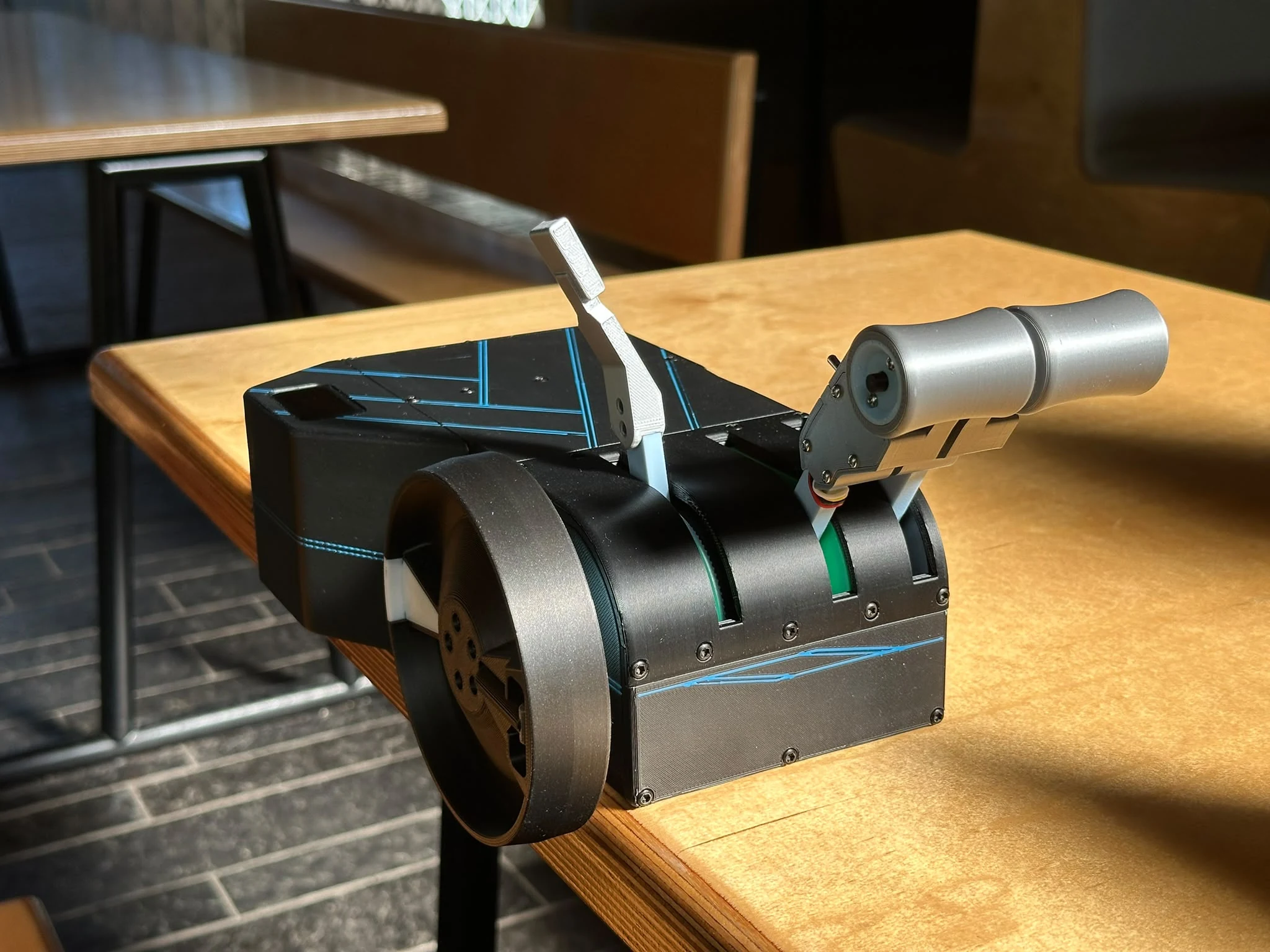
We’re developing ThrottleSync, a desktop throttle quadrant with four motorized axes: two throttles, a speed brake lever, and a trim wheel. It also has a trim display, TO/GA and A/T disconnect buttons, and separate reverse unlocks.
The motors have two jobs: keeping the physical controls synchronized with the aircraft, and producing detents and resistance that change with the selected aircraft. Our feature demonstration shows how that works in the PMDG 737, FlightFX Hawker 800XP, FSLabs A321, and A2A Comanche 250.
Autothrottle and manual override
On the PMDG 737, the physical throttles follow the cockpit levers when A/T changes thrust. Moving the hardware sends input back to the aircraft. You don’t need to select a separate following or manual-input mode.
In the demonstration, you can rest your hand on the levers and feel them move without overriding A/T. Pushing firmly overrides the motor following, but does not disconnect A/T in the aircraft. With A/T still engaged, it can command the levers back again. The PMDG FMC option for A/T manual override was set to Always for this demonstration.
Pressing the A/T disconnect button switches to manual control. When you take over on approach, the physical levers are already at the cockpit lever position.
Reverse on the main throttle levers
Forward idle sits above the bottom of the hardware’s travel. The motors resist movement below idle until you use the reverse unlock for that throttle. Pulling the main lever below idle then controls reverse thrust.
Once in reverse, you can release the unlock. Returning to forward idle closes the gate again. The gate is produced by motor resistance, so it is not a rigid mechanical stop.
Speed brake arming on the 737
The speed brake has a motor-generated ARM detent and follows the cockpit handle, including the automatic deployment shown during the landing in the video.
There is a specific workaround for the PMDG 737: when you move the lever back from an extended position to ARM, the cockpit handle first goes to DOWN, then ARM. This addresses the arming problem encountered when returning directly to ARM through an axis input. You can see that sequence in the demonstration.
Motorized trim and a matching display
The trim wheel follows changes made by the yoke’s trim switch, the mouse, or the aircraft’s automatic trim. Turning it by hand sends trim input back to the sim. The display shows the simulator’s trim value, with different faces for the 737, Hawker, and A321.
One thing that stood out during the A321 flight was how often the trim wheel moved during ordinary manoeuvres. It is easy to miss that movement when looking at the forward view. With the wheel on the desk, it becomes noticeable. There is some following delay, which is visible in the demonstration.
What changes with the aircraft
FSLabs A321: the motors produce the reverse, IDLE, CL, FLX/MCT, and TOGA detents. The levers stay at the selected detent while autothrust varies engine thrust. The speed brake uses the forward end of the hardware’s travel for ARM, with RET at about 20% travel; it does not physically pull upward like the Airbus handle. The display includes trim, both throttle positions, and speed brake position.
FlightFX Hawker 800XP: the speed brake resists movement past OPEN unless FULL flaps is selected. Selecting FULL releases the range used for lift dump. You feel the restriction in the hardware as well as seeing it in the cockpit. The Hawker also has its own trim display.
A2A Comanche 250: the left throttle becomes throttle, the right throttle becomes propeller control, and the speed brake lever becomes mixture. The same three levers cover the Comanche’s engine controls, with the trim wheel still working in both directions between hardware and sim.
Setup and compatibility
The companion app handles supported aircraft profiles, control mappings, detents, and display selection. Aircraft-specific setup can still be needed, such as the PMDG override option mentioned above. The feature and setup guide explains the controls and the configuration used in the demonstration.
Support is specific to the add-on. An FSLabs A321 profile does not establish support for a different developer’s Airbus. The current PMDG 777, Asobo/Working Title 787-10, and Hot Start Challenger 650 profiles leave the physical trim wheel disabled. Check the compatibility list, including its untested entries, for your aircraft.
For pricing, reservation details, and delivery estimates, see Pre-order & FAQ. You can also view the product animations or email us about your aircraft or mounting setup.